1)Open the image you want to add effects to in Photoshop.

2) Copy the original image layer.

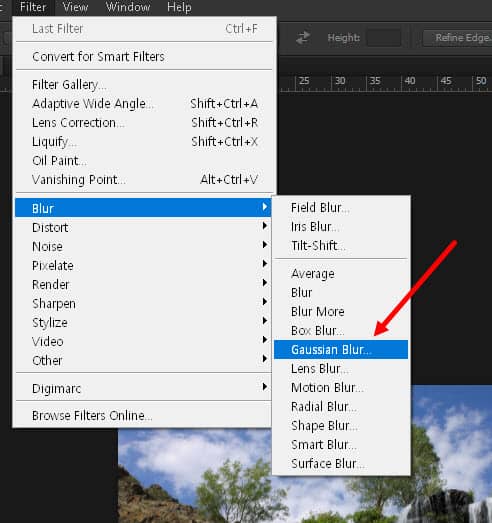
3) Go to the Filter menu at the top and select Blur > Gaussian Blur.
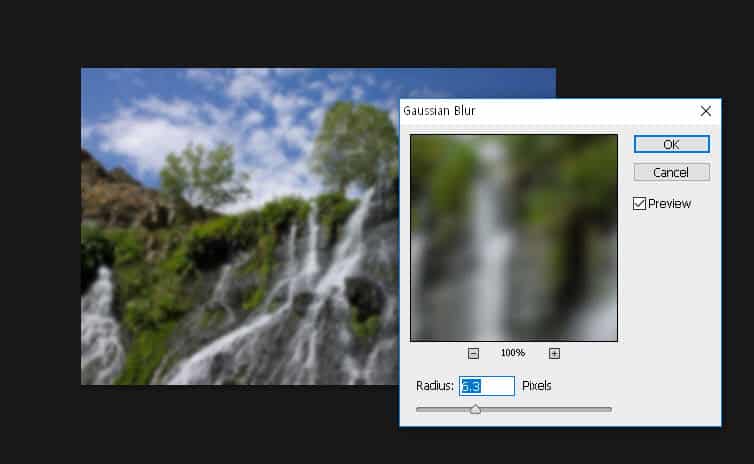
4) Enter the radius value and confirm.
5) Change the blend mode of the layer to screen and lower the opacity of the layer.


6)You can see that a Bright and soft blur effect has been added to the image.

![[Photoshop] How to remove white outlines from edges of images(Defringe)](https://inspired-learn-create.com/wp-content/uploads/2025/06/2019-05-17_23-30-43.jpg)
![[Photoshop] How to change text to uppercase or lowercase](https://inspired-learn-create.com/wp-content/uploads/2025/06/2021-08-03_18-12-23.jpg)
![[Photoshop] Collapse or expand all Groups in the Layers panel using shortcuts](https://inspired-learn-create.com/wp-content/uploads/2025/06/2021-08-05_13-46-57.png)