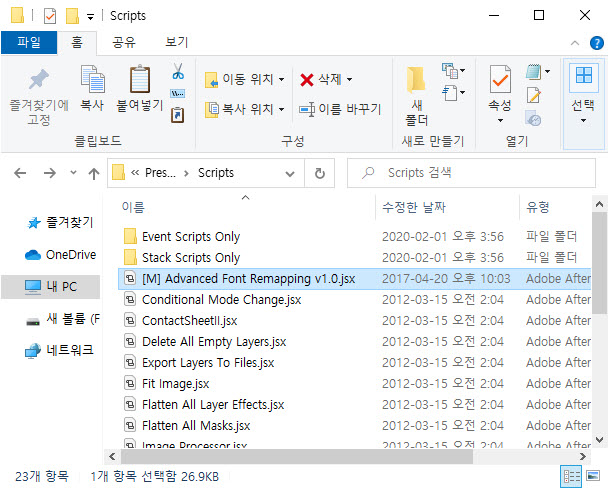
1) Prepare a JavaScript file (.jsx)

Copy the script file to your Photoshop installation path.
2) Copy the jsx file to the folder in the path below.
C:\Program Files\Adobe\Adobe Photoshop version\Presets\Scripts
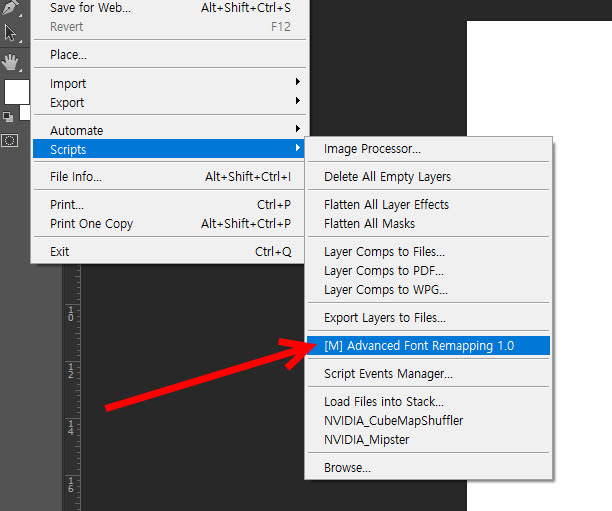
3) When you restart Photoshop, you can check the installed script in the scripts in the file menu at the top.
Load script files directly into Photoshop
4) To load scripts directly in Photoshop, go to browse in scripts in the file menu at the top.
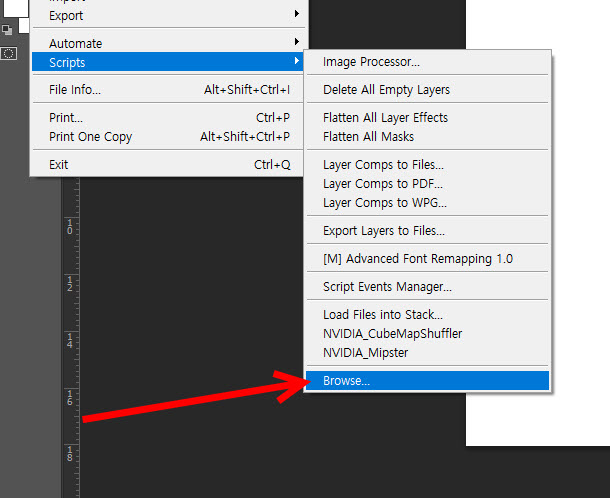
5) Select the script file.

Setting script shortcuts
6) To set a script execution shortcut, go to keyboard shortcuts in the edit menu at the top.
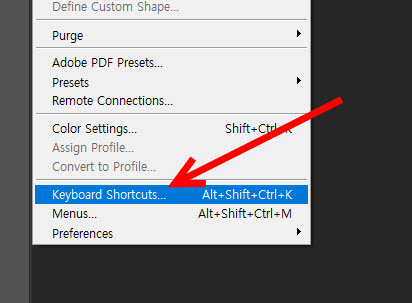
6) Select a script item and set a shortcut.

![[Photoshop] How to remove white outlines from edges of images(Defringe)](https://inspired-learn-create.com/wp-content/uploads/2025/06/2019-05-17_23-30-43.jpg)
![[Photoshop] How to change text to uppercase or lowercase](https://inspired-learn-create.com/wp-content/uploads/2025/06/2021-08-03_18-12-23.jpg)
![[Photoshop] Collapse or expand all Groups in the Layers panel using shortcuts](https://inspired-learn-create.com/wp-content/uploads/2025/06/2021-08-05_13-46-57.png)