Reset the path of missing images if the file path of the source image has changed
1) In the example, you can see that some of the images used in the project are missing (Project panel)

2) Select the missing image, right-click and select Reload Footage.

3) If the file location of the source image has changed and the file does not exist in the folder, it will be displayed as shown below.
Affter Effects: No file fount at

4) To reset the file path of a missing image, select the image, right-click, and select replace footage>file.
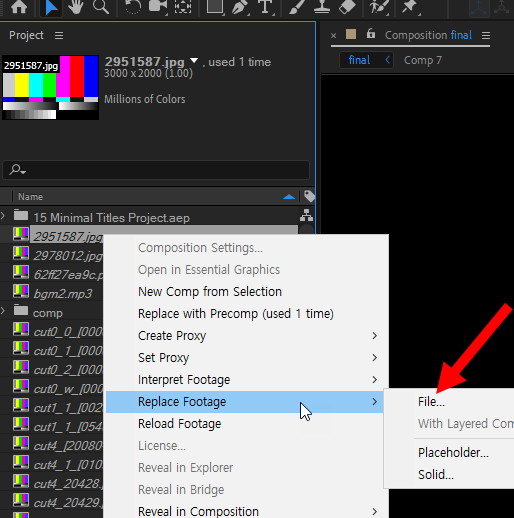
5) Select the file of the missing image and click import.

6) You can reset the folder where the source image file is located and check that the image has been loaded normally.

![[After Effects] How to change user language to English](https://inspired-learn-create.com/wp-content/uploads/2025/06/2019-08-29_11-01-19.png)
![[After Effects] How to save a frame as an image file](https://inspired-learn-create.com/wp-content/uploads/2025/06/2020-10-30_21-37-54.png)
![[After Effects] Changing the Color of a Solid Layer](https://inspired-learn-create.com/wp-content/uploads/2025/06/2020-02-03_10-17-32.jpg)